Downloading VBO Piping – The Newest SketchUp Extension
Concept about the VBO Piping for the SketchUp Software
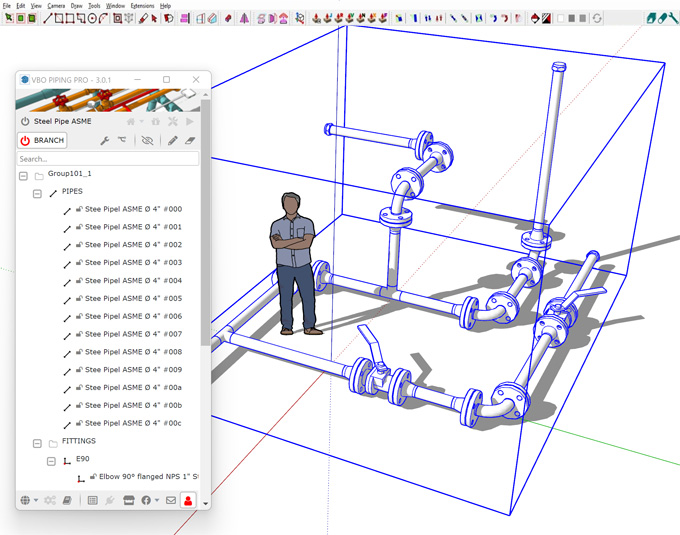
VBO Piping is one of the useful extensions for the SketchUp software, which involves the generation of pipes from edges in selected components or groups. The VBO Piping also includes fittings to the vertices. The VBO Piping plugin has the capability to update the design after editing the source (group or component of edges), replace or edit the fittings, the size of the pipes and others.
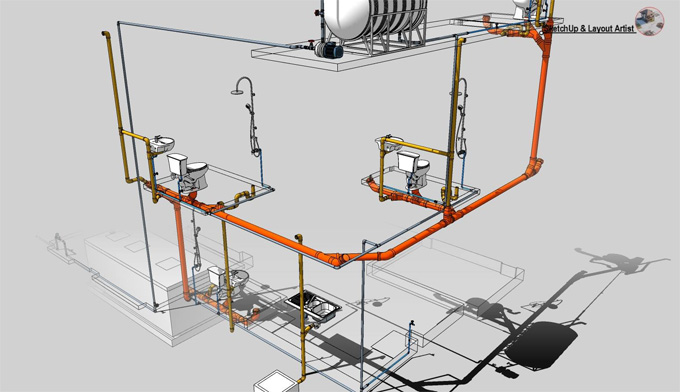
The VBO Piping plugin has compatibility to work with different versions of the SketchUp software, such as SketchUp 2018, SketchUp 2019, SketchUp 2020, SketchUp 2021, and SketchUp 2022. The VBO Piping extension can work with Windows. The supporting language for the VBO Piping extension is English.
The VBO Piping extension works best with Windows OS 10 or higher. It is recommended to use the VBO Piping extension in SketchUp 2019 or a higher version. This SketchUp extension can also work in SketchUp 2018, but it becomes slower, and network problems have been seen. The best program has been seen in the SketchUp 2020.1 version.
Discuss the design features of the VBO Piping for the SketchUp software
The VBO Piping extension can be used in different ways, which are as follows:
1. In the case of selecting a set of design components or groups, all the inside edges of the branch pipes are outlined with options, like type, size and selection. These options can be selected from an information box.
2. The VBO Piping extension can add fittings, such as elbows or tees, automatically to the vertices within the pipe network.
3. The VBO Piping extension offers branch modifier tools, which enable users to modify the branches of the piping system as per the design requirements.
4. While modifying the branches, there are several options for the users, like turning, redrawing the branches, physically replacing fittings, and including and replacing lessened bramble. The users are also able to add names and a shading feature to any branches. Thus, this SketchUp plugin can adjust a fitting within the SketchUp software.
5. With the help of the VBO Piping plugin, users are able to switch easily between displaying the branches in 2D and 3D views. This can be done by turning on and off the layers “8_mep_piping2D” and “8_mep_piping3D”.
6. With the help of the VBO Piping plugin, the users are also able to edit source edges and vertices by double-clicking on Edit Group or Edit Component while editing a branch pipe. After this process, the branch pipe will update to its settings just after the user finishes updating the Group or Component. These collections consist of several components, like PVC, PPR, metal, welded pipe and electrical pipe. The users are also allowed to create a bill of materials for pipes and fittings.
7. The professional version of the VBO Piping extension helps to add broader library support beyond the metal pipes and also offers more advanced customisation options to design complex layouts.
Learn about the process of using the VBO Piping for the SketchUp software
? To use the VBO Piping extension, the user has to select the groups in their design project and has to run this SketchUp plugin.
? In the next step, the user has to select the type of material.
? After that, the user can determine the diameter of the piping system that they will be creating.
? In the next step, the user has to decide how the connection endpoints will end using the endcap, socket, or flange options.
? After that, the user can select the type of socket connection from the socket or ball valve options.
? After saving the settings, the design module is ready. In the case that the user wants to make changes to the operating model, the user can enter the group and continue adding or removing the port.
Understanding the process of downloading the VBO Piping plugin for the SketchUp software
To download the VBO Piping extension, several steps need to be followed, which are:
1. At first, the users have to open the SketchUp software, then they should go to the Window and go to the SketchUp Extension Warehouse.
2. After that, the user has to search for the “VBO Piping” extension and has to click on the install button.
In the case of directly downloading the VBO Piping plugin, the user has to download the VBO_Piping.rbz file from the SketchUp Extension Warehouse. After that, the user has to go to the SketchUp software, go to the Window option and then go to the Extension Manager option.
To learn more, watch the following video tutorial.
Video Source: TutorialsUp
Download VBO Piping
After that, the user has to click on the install extension button and select the downloaded .rbz file. Thus, the VBO Piping plugin has been installed in the SketchUp software.