Trimble Sketchup Pro Software for Engineers & Architect
Discuss the latest version of the SketchUp software by Trimble
Collaboration features
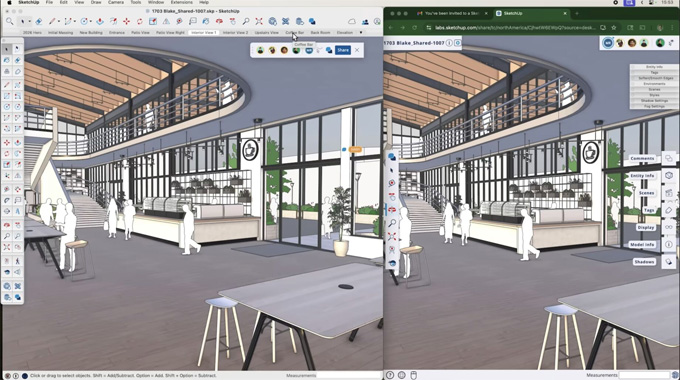
By using the SketchUp 2026 software version, users are able to invite clients to review the design work and navigate the design models. The SketchUp 2026 version also offers updated PBR materials along with colour control, distance multiplier and roughness map feature for the ambient occlusion.
Updated design layout
With the help of SketchUp 2026, the user can get an update to the design layout, which helps to generate the 2D documentation process from 3D design models. The SketchUp 2026 offers extend, trim, fillet and Chamfer, plus drafting tools, which help to update to the DWG workflows.
Design workflow
SketchUp 2026 is available with workflow improvements to the live components, which can work with large scenes.
Visualisation feature
The SketchUp 2026 software version is also able to invert a material’s roughness map and can select the thumbnail as per the user’s preferences while viewing the design materials.
Interoperability feature
Different fidelity and efficiency improvement features have also been offered by the SketchUp 2026 software version, which helps to import and export the DWG files. This import and export feature involves hatch support and helps to preserve section planes. In the SketchUp 2026 software, the IFC export workflow has also been improved.
Scanning feature
The SketchUp 2026 software version also offers scanning features, which can control the visibility of the point clouds within the SketchUp software. With the help of the SketchUp 2026 software, users are able to revert to the original georeferenced coordinate systems while exporting the drawings.
Adding live design components
The scale tool in the SketchUp 2026 software enables users to add grips to the designs. In addition, the users can also place and size live design components by using this scale tool. By using the paint tool in the SketchUp 2026 version, users can apply design materials outside of a component’s predefined options. By painting live design components, the users can add several quality-of-life improvements to the designs.
Improving design performance
The SketchUp 2026 software version helps to improve memory and working efficiency, which helps to get more efficient and reliable design output within a short time. These features are really effective while working with large design models.
Managing feature
The SketchUp 2026 software version also allows users to reset all design activations and authorise their current devices without leaving the SketchUp software.
System requirements
The SketchUp 2026 software version is compatible with both Windows 10+ and macOS 13.0+. 2+ GHz processor is required for the 64-bit Windows 11 operating system. While using the Windows operating system, a minimum of 8 GB of RAM and 6 GB of hard-disk space are required. On the other hand, while using the Mac operating system, a 2.1+ GHz Intel processor or an Apple M1/M3/M4 series chip is required to run SketchUp 2026. In addition, a modern GPU with 1GB memory and Metal 2 support, along with a minimum of 8 GB RAM and 6 GB of hard-disk space, is also required to run the SketchUp 2026 software version.
How to get the SketchUp Pro Licence
SketchUp Pro is one of the most versatile graphic design software programs that has been used by professionals and for personal use by engineers, architects and interior designers. The SketchUp Pro version is available in both online and Desktop versions, thus providing design flexibility to the users. The SketchUp Pro software has the ability to blend with 2D and 3D design capabilities. The SketchUp Pro software version is compatible with FreeCAD, AutoCAD, and LibreCAD.
To get the license for the SketchUp Pro software, the user has to buy a paid annual subscription online and also has to sign in to the Trimble ID. In this context, the user has to follow several steps, which are as follows:
1. At first, the user has to visit the official SketchUp Plans and Pricing page.
2. After that, the user has to select the SketchUp Pro option and has to complete the online checkout.
3. A Trimble ID needs to be generated by the users, and this can be done using the email address that was used during the purchase.
4. After that, the user has to download the installer from the official website, and next, the user has to install the SketchUp Pro version on their computer.
5. In the next step, the user has to open the SketchUp Pro software and has to click the Sign in button.
6. The user has to log in with the Trimble ID credentials, which helps to activate and verify the active subscriptions automatically for the SketchUp Pro version.