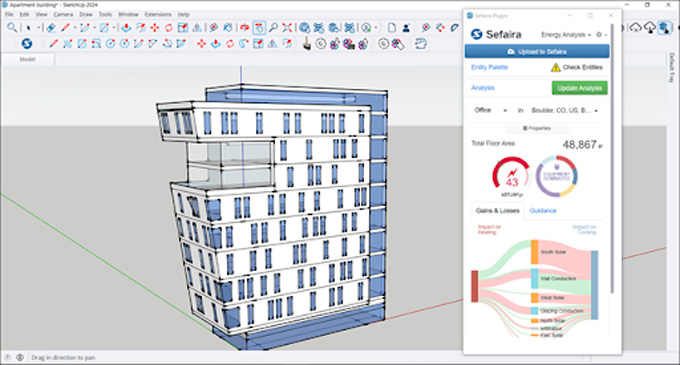
Getting Started with Sefaira for SketchUp
Sefaira is one of the software applications for the SketchUp software, which enables architects, building designers and engineers to optimise and analyse the performance of their designs in terms of daylighting and energy efficiency, thus helping to meet the sustainable goals of the building structure. The intuitive interface of the Sefaira extension allows for fast, iterative exploration of design options.
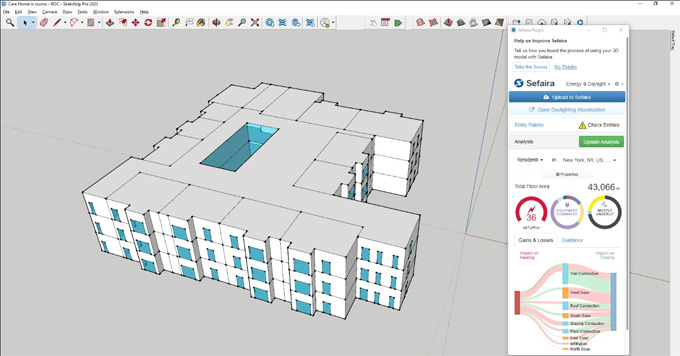
The Sefaira extension can integrate with the 3D modelling environment of the SketchUp software, which helps to provide real-time feedback on energy daylighting, as well as the overall environmental performance of the building structure. With the help of the Sefaira plugin, users are allowed to analyse different aspects of the building designs.
The building energy performance feature of the Sefaira plugin enables users to upload the SketchUp design model to the Sefaira web application, thus they can optimise different HVAC system options, perform thermal comfort calculations and utilise natural ventilation strategies.
This SketchUp plugin is compatible with the different versions of the SketchUp software, including SketchUp 2023, SketchUp 2024, SketchUp 2025, and SketchUp 2026. Both Windows and Mac are compatible with the Sefaira plugin, and the supported language for this extension is English.
Users are able to try and evaluate the Sefaira plugin in demo mode if they have a SketchUp STUDIO, PRO or TRIAL license.
Discuss the system requirements of the Sefaira extension for the SketchUp software
Any supported version of the SketchUp software can be used for the Sefaira plugin. Several operating systems can also be applicable for the Sefaira plugin, which includes Windows 10, Windows 11 and macOS. The web browsers that support the Sefaira plugin are Google Chrome, Firefox, Safari, and Microsoft Edge.
Learn about the key design features of the Sefaira plugin for the SketchUp software
Thermal comfort feature
The Sefaira plugin enables users to improve operative temperature by shading, and also helps to measure the impacts of window openings on air temperature.
Daylight option
With the help of the Sefaira plugin, the users are able to choose between Direct Sun Exposure, Daylight Factor, and Annual Daylight outputs.
Energy use and carbon emission
The Sefaira plugin can understand the design’s impact on energy cost and CO2 emissions, as well as can also measure the potential impact of a renewable system.
HVAC option
The users are able to access the impact of architectural features on HVAC sizes with the help of the Sefaira plugin. In addition, preliminary HVAC sizes can also be generated with the help of the Sefaira plugin to improve the cost estimation procedure.
Entity palette for the Sefaira plugin
The Sefaira plugin is able to assign the correct type to each entity in the design model. In the case of certain entities ignored or the entity needs to be changed manually, the Entity palette of the Sefaira plugin can fix this issue. In this context, the users have to click on the Show Entity Types, which allows colour codes for all entity types for easy identification. Users can select one or more entity types with the help of the Sefaira plugin, which will show or hide certain parts of the design model. While the users right-click on the entity and go to the Sefaira plugin, the entity will be tagged along with a specific type or clear existing tags.
Discuss the key advantages of the Sefaira plugin for the SketchUp software
Easy to use
The Sefaira plugin helps to model simple geometry in the SketchUp software, which helps to get first results within minutes. Thus, the users are able to share their design proposals easily by using easy-to-understand graphics of the Sefaira plugin.
Credible feature
With the help of the Sefaira plugin, the users are able to run hour-by-hour annual simulations by using industry-accredited EnergyPlus and Radiance.
Collaborative feature
The users are also able to get peer-review results easily with the help of the Sefaira plugin. The users are able to work as a team by leveraging Sefaira’s cloud-based platform.
Process of installing the Sefaira extension
To download the Sefaira plugin, users have to visit the Sefaira plugin download website. After completing the download procedure, the user has to run the installer, agree to the terms and conditions, and then they have start or restart the SketchUp software.
To learn more, watch the following video tutorial.
Video Source: SketchUp Australia & New Zealand
Download Sefaira Extension for SketchUp
After following these steps, the Sefaira plugin will appear under the Extensions menu of the SketchUp software. While launching the Sefaira plugin, the user may have to log in by using the Trimble ID associated with the Sefaira subscription. After logging in, the Sefaira plugin will appear in the modelling window.