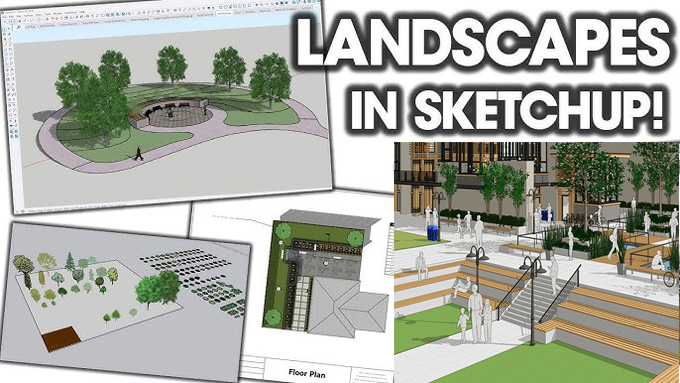
Design and Visualize Landscape Gardens using SketchUp
Discuss the role of the SketchUp software in the landscape architecture workflows
The SketchUp software has been used in the landscape architecture design workflows, which can be influenced by the following phase:
Pre-design phase
In the pre-design phase, the SketchUp software enables the landscape architects to consult early in the design project, which enables them to assess the existing site. The SketchUp software provides several sustainable strategies to the landscape architects during this pre-design stage, which include the reduction of the heat island effect, the reduction of the light pollution and the installation of the beneficial shading areas.
During this pre-design stage, the landscape architects can assess and provide data on the quality of the outdoor spaces. This pre-design stage also enables the landscape architects to understand the interventions that impact the outdoor spaces, thus the landscape architects can make more effective design strategies in the specific location.
Schematic design phase
In the schematic design phase, the landscape architects can plan and illustrate the site elements. In this design phase, the primary concerns of the landscape architects are:
➢ Maintaining the site design guidelines and standards.
➢ Focusing on the paving and site structures.
➢ Maintaining the irrigation system.
➢ Focusing on the circulation of pedestrians, equestrians, bicycles, and other vehicles.
➢ Focusing on the site furnishings.
➢ Maintaining water features.
In the schematic design phase, the landscape architects can populate their design models. The SketchUp software provides several pre-made 3D models to populate the landscape design models.
Design development phase
During the design development phase, the landscape architects can shape a floor plan. The landscape architect can imagine how the ground plane of the site might look and design its shape. The intuitive tools of the SketchUp software allow the landscape architects to model the design surface and ground planes more accurately.
Construction documents phase
During the construction document phase, the landscape architects are involved in the measurement of the material and site features’ quantities nd qualities. In this phase, the landscape architects can reduce the heat island effect, reduce light pollution, maintain shading areas, maintain site circulation, and also provide sustainable approaches for water or energy. With the help of the SketchUp software, the landscape architects can make key decisions regarding certain materials that affect the environmental quality of the construction site. The SketchUp software helps to perform takeoffs of areas and show materials.
Construction administration phase
During the construction administration phase, the landscape architects can ensure that the designs are installed and built correctly and to the design quality specified in their drawings. The renderings achieved by the SketchUp software help to show the final design intent. The SketchUp software allows landscape architects to use it for a free trial, which enables them to access the full suite of SketchUp design tools to visualise the pre-design stage, design essentials, and access other design features.
The reason behind choosing the SketchUp software for landscape architecture design
3D terrain and site modelling feature
The SketchUp software enables the landscape architect to import CAD files or survey data, to create contour lines, topography and site surfaces.
Plant and object library
With the help of the SketchUp software, the landscape architects can access millions of pre-built 3D design models of trees, shrubs, pathways and outdoor furniture. The SketchUp software also helps to visualise the fact that how sunlight and shade will affect the landscape at any time of the year, which enables the landscape architects to plan greener and more functional spaces.
Photorealistic rendering feature
The landscape architects can use rendering extensions of the SketchUp software to create stunning and lifelike visuals.
Smooth collaboration feature
The SketchUp software also enables landscape architects to export and import files across DWG, DXF, and other formats. This feature enables the landscape architects to integrate the design works seamlessly into the wider design process.
Learn about the design ideas that can be created in the SketchUp software
The full landscape design workflow, from concept to presentation and documentation process, has been supported by the SketchUp software. The SketchUp software enables design professionals to explore a wide range of landscape design ideas within a short time. This ability of the SketchUp software helps to make innovative plans for the outdoor landscapes before the beginning of the construction process. Several design ideas for the landscape architecture derived from the SketchUp software are as follows:
To learn more, watch the following video tutorial.
Video Source: SketchUp
Download Landscape Architecture
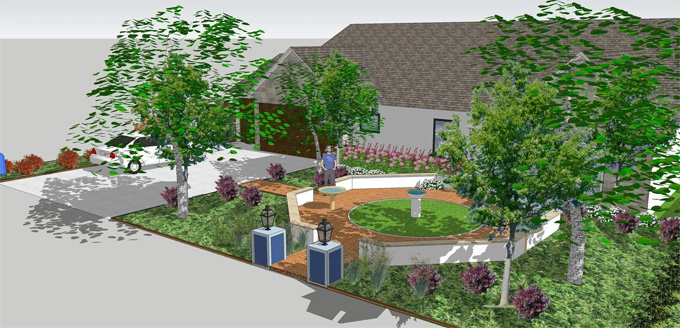
➢ With the help of the SketchUp software, modern garden layouts, along with pathways, planting zones, and patios, can be created.
➢ The outdoor living areas, along with seating, lighting and pergolas, can also be made.
➢ The SketchUp software can also make sustainable landscape architecture, along with water management features and green spaces.
➢ The SketchUp software also gives ideas about the public park and urban landscape design concepts.
➢ The design concept for the residential backyard and pool area design has also been given by the SketchUp software.