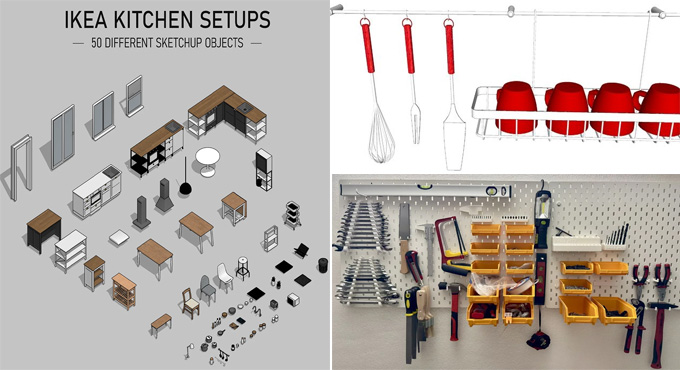
How to Model any IKEA Furniture in SketchUp
Concept of IKEA Tools for SketchUp Software
IKEA acts as a home furnishing solution for the SketchUp software. The IKEA furniture is an AI-powered home design solution which has been available exclusively on the OpenAI GPT Store. The integration of IKEA within the SketchUp software helps to create accurate 3D design models of the IKEA furniture. With the help of the IKEA solutions, users are also able to experiment with different layouts and can preview the interior spaces before exporting and purchasing the design.

The IKEA solutions are becoming popular among homeowners, DIY enthusiasts and interior designers, as they provide perfect planning for IKEA furnishing projects. Users can access the customisable design models from the wide library of IKEA solutions, which helps to ensure a precise fit into the house model and saves overall design time. The IKEA tools of the SketchUp software also help to streamline the entire design process, thus helping users avoid common mistakes in their designs and making confident decisions regarding purchasing.
Design features of IKEA tools for SketchUp software
With the help of the IKEA tools of the SketchUp software, users can create different furniture designs for home decor. The design features offered by the IKEA tools are as follows:
Kitchen design feature
The IKEA tool offers almost 25 different kitchen series in all styles, which provide all design ideas to the users, from ideas to installation of the kitchen design. The IKEA tools enable users to combine the design components as per their liking, and they can add plinth-all as per their liking.
Creating ideal storage
With the help of the IKEA solutions in the SketchUp software, the users are able to create their own custom storage units, and this can be done by mixing and matching different types of cabinets in different colours and sizes. The IKEA tools also allow users to personalise the space of the storage with the kind of storage unit that fits with their space and design needs. The users can access a combination of open and closed storage along with the freedom to hide or display their things.
Creating personalised storage
With the help of the IKEA solutions in the SketchUp software, the users are able to create more personalised storage. For example, the user can create storage solutions for accessories and clothes. IKEA solutions offer several features to create personalised designs of the storage, which are:
1. BESTÅ feature enables users to plan living room storage design more easily. These features are practical, stylish and easily customisable.
2. EKET feature helps to create floor and wall storage solutions for oddly shaped spaces.
3. KALLAX planner helps to plan a personalised combination of ideal storage and shelving solutions.
4. The design components of the garage can also be organised with the help of the BROR feature within the SketchUp software.
5. PAX tool enables users to put together each and every little detail of the wardrobe visually.
Designing a comfy sofa
With the help of the IKEA solutions, users can easily accommodate the seating arrangement to fit their living room size and style. The sofa design features are as follows:
1. The GRÖNLID tool allows users to create a flexible and comfortable sofa along with washable covers.
2. SÖDERHAMN sofa modules of the IKEA tools help to fit deep and comfortable sofa combinations in different sizes.
3. The VALLENTUNA tool enables users to create as much seating as their choice in different layout combinations.
Designing wardrobes
The IKEA tools of the SketchUp software also offer several wardrobe solutions.
1. The PAX tool of the IKEA solutions allows users to visually plan a customisable and flexible wardrobe storage, which will be fitted into the living space.
2. The JONAXEL planner tool allows users to combine baskets and open shelves, which helps to use each and every inch of the storage space.
Designing living room and space
The IKEA tool offers numerous living room storage ideas, which allow users to make the most of relaxing and entertaining home designs. The living room storage ideas have also been used to create designs for TV, media furniture and covers. With the help of the IKEA tool, the user selects the pieces of furniture, which helps to improve the look and functionality of the living space. The living room and space design features of the IKEA tools are as follows:
1. BESTÅ tool enables users to make planning regarding the elegant living room storage more easily.
2. The KALLAX tool helps to create a personalised combination of shelving and ideal storage solutions.
3. The sofa planners of the IKEA tools give users complete freedom to create seating arrangements in the living room which will fit the size and style of the living room.