Modeling and Assembling Grasshopper Steam Engine in SketchUp
Concept about the Grasshopper for the SketchUp software
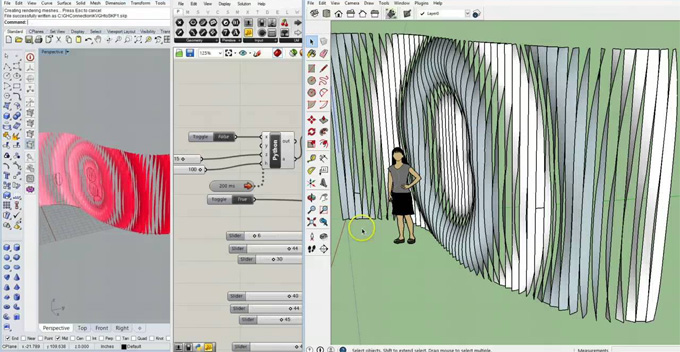
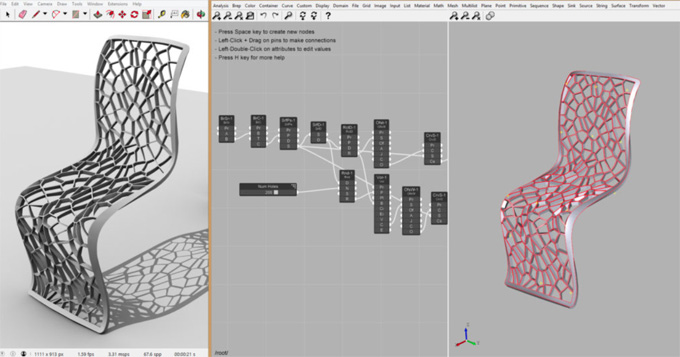
Grasshopper is the visual parametric modelling tool for the SketchUp software, which is available with a node-based editor 51 plus nodes. The Grasshopper tool can integrate with the 3D modelling capabilities of Rhino, as well as help to empower the architects and designers to create more complex forms. The intuitive interface of Grasshopper helps to make parametric design more accessible, helps to streamline the design workflow, helps to optimise the design interactions and also helps to foster the unparalleled creativity of the design models.
The Grasshopper tool is compatible with the different versions of the SketchUp software, including SketchUp 2024, SketchUp 2025 and SketchUp 2026. The Grasshopper tool is compatible with both Mac and Windows operating systems. The supporting languages for the Grasshopper tool are Czech, English, German, Spanish, Italian, French, Dutch, Brazilian Portuguese, Polish, Swedish, Russian, Turkish, Japanese, Simplified Chinese, Korean, and Traditional Chinese.
Categories of the Grasshopper for the SketchUp software
There are different categories of nodes offered by the Grasshopper tool for the SketchUp software, which are as follows:
Shapes
With the help of the Grasshopper tool, the user can create different types of shapes, for example, cylinder, tube, box, cone, pyramid and others.
Math
By using the Grasshopper tool, the user can do math on any design parameter for dynamic control.
Geometry
The Grasshopper tool can draw different design geometries, like get points, vector and bounding box, which helps to define positions of the design models, extract the coordinates and query the model data.
Transform
The Grasshopper tool can also transform the design geometries along with more precise vector-based control that has been driven by node connections.
Boolean
The Grasshopper tool can also combine the design shapes along with the automatic edge welding and hole repairing feature to achieve clean, solid design geometry.
Modify
The Grasshopper tool can also offer advanced geometry editing options through its simple node parameters.
Organise
With the help of the Grasshopper tool, the user can also manage the design model structure directly from the node graph.
Data
The Grasshopper tool also helps to manipulate the data flowing between the node parameters.
Logic
The user can also add intelligence to the parametric design models by using the Grasshopper tool.
Learn about the key features of the Grasshopper for the SketchUp software
User-friendly design interface
The Grasshopper tool offers an intuitive design interface for users, which is more approachable for users of all experience levels.
Offering customisable design options
The Grasshopper tool offers a high degree of customisable features for the specific design workflow.
Offering a third-party extension
A vast library of third-party extensions has been offered by the Grasshopper tool, which helps to expand its functionality and also helps to tackle the most intricate design challenges.
Visual programming feature
The visual programming environment of the Grasshopper tool allows users to create design algorithms with ease.
Live preview feature
With the help of the Grasshopper tool, the user can preview the updated 3D models in real-time within the SketchUp software.
Dark glass interface
The modern user interface of the Grasshopper tool offers starfield background, backdrop blur, and monospace typography options, which are very useful for long modelling sessions.
Export or import feature
The user can save the entire node setup as a .schema file, which can also be shared with others or reused throughout other design projects.
Quick node management feature
The node management options of the Grasshopper tool enable import, export, minimap, freeze or other options for the users.
Discuss the key advantages of Grasshopper for the SketchUp software
Helps to streamline the design workflow
The Grasshopper tool helps to automate the repetitive design tasks, as well as helps to simplify the design workflow, which helps to reduce the design time for creative exploration of the designs.
Create highly complex forms
The Grasshopper tool can also generate intricate and complex design forms.
Providing innovative solutions
The Grasshopper tool also provides innovative solutions for the design model, which are unattainable through manual design methods.
Exploring rapid design iteration
The Grasshopper tool also helps to explore multiple design models quickly, which helps to foster a more iterative design process.
How to link Grasshopper with the SketchUp software
Numerous plugins are available to bridge the gap between the Grasshopper tool and SketchUp software and link the Grasshopper and SketchUp design models. These extensions allow design professionals to transfer Grasshopper design models to the SketchUp software. In addition, the design professionals can also streamline their design workflow by linking the Grasshopper and SketchUp design models. This feature helps to create a more detailed design model in both Rhino Grasshopper and SketchUp, without losing any kind of information or design quality.