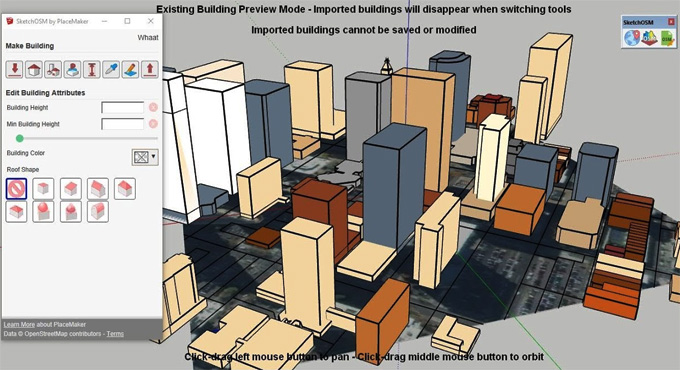
Features of the SketchOSM by PlaceMaker

The SketchOSM extension has been developed by PlaceMaker for the SketchUp software, which enables users to create parametric building designs. The design procedure can be done with just a few clicks with the help of the SketchOSM plugin. After creating the 3D buildings, users are also able to add site context to the design model with the help of the SketchOSM plugin.
The users are also able to share these 3D building models by uploading these models to the OpenStreetMap. Due to this functionality, this SketchUp extension got its name. The OpenStreetMap has been found on Earth, which can be accessed by any person.
This database of geoinformation is also editable by anyone. There are no hidden charges or advertisements required for accessing the OpenStreetMap for the users. This SketchUp extension has been used by several devices and services, for example, apps, websites, or GPS, and is also used by millions of people throughout the world. The SketchOSM extension is completely free for users and only available in the English language. This SketchUp plugin can be found on the SketchUp Extension website.
Design features of the SketchOSM by PlaceMaker
There are numerous design features that have been offered by the SketchOSM extension for the SketchUp software, which are as follows:.
➢ The SketchOSM extension has been compatible with SketchUp 2017+ Make or SketchUp Pro and has been supported by Windows.
➢ The SketchOSM extension has a Geo-location tool, which helps to geo-locate the design model. In action, this tool also helps to import a satellite image from DigitalGlobe, which acts as the reference to trace the buildings.
➢ The SketchOSM extension also helps to import OSM road centerlines, as well as it also helps to show the existing OSM 3D Buildings for reference.
➢ The SketchOSM plugin by PlaceMaker also helps to create simple OSM 3D building designs.
➢ The SketchOSM extension also helps to create simple, single-part buildings, as well as multi-part complex buildings.
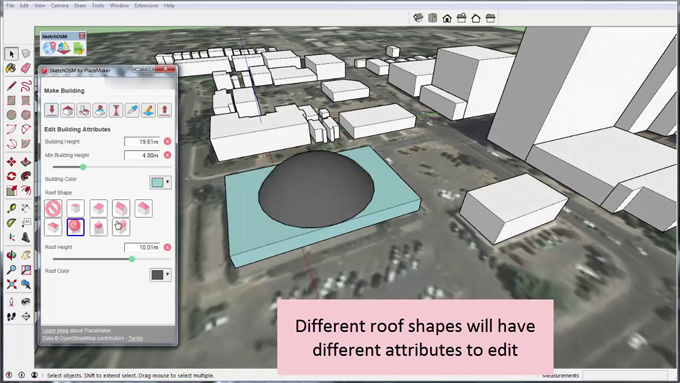
➢ Several parametric tools have also been offered by the SketchOSM extension, which enable users to edit the new building designs. These parametric tools enable the users to edit the shape of the roof, changing the colour of the roof, editing the building outline, changing the colour of the building, changing the height of the roof and creating the minimum height of the building.
➢ The users are able to copy the attributes from one building to another with the help of the SketchOSM extension for SketchUp software by PlaceMaker.
Key functionalities of the SketchOSM by PlaceMaker
➢ With the help of the SketchOSM extension, the number and quality of the 3D buildings have been increased.
➢ A wide range of useful tools has been offered by the SketchOSM extension, which enables users to add more 3D buildings to the OpenStreetMap.
➢ The OSM editing option has been introduced by the SketchOSM extension, which allows millions of SketchUp users throughout the world to edit their building design models.
➢ The users are able to geo-locate the building design models to select the location on which they want to create the building designs. In this context, the user has to zoom in on the design to the maximum level before importing the design model to get the best imagery resolution.
➢ The SketchUp built-in tools offered by the SketchOSM plugin help to trace the faces over top of building outlines.
➢ The SketchOSM plugin helps to open the SketchOSM dialog, in this regard, the user has to log in to the OSM first.
➢ Users are allowed to select the building outline face and click on the ‘Create Buildings’ button. This feature helps to create new building models.
➢ Users can also select the new building ‘group’, thus they can adjust the building attributes.
➢ Users are also able to upload the building designs to OSM by using the upload button.
➢ After creating the building design, the users can also sample the settings of their building designs and apply those building designs to other building design models. This feature allows users to create things like neighbourhoods quickly.
➢ With the help of the edit building outline tool offered by the SketchOSM plugin, users can also update a building footprint.
Process of installing the SketchOSM by PlaceMaker
For installing the SketchOSM extension, the users have to follow several steps, which are as follows:
1. At first, the users have to download the SketchUp software.
2. After that, the users have to install the SketchUp software by double-clicking on the downloaded installer file.
3. In the next step, the users have to run the SketchUp software and has to open the SketchUp Extension Warehouse.
To learn more, watch the following video tutorial.
Video Source: mind.sight.studios
Download SketchOSM by PlaceMaker
4. In the next step, the users have to search for the SketchOSM extension and then has to install this plugin.