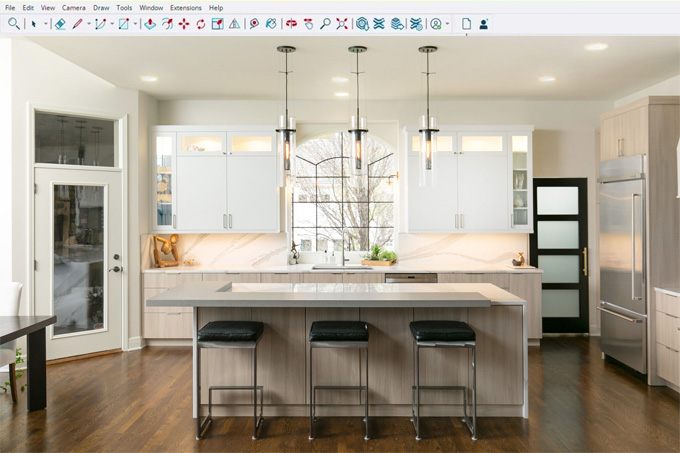
Eclipse Cabinets PRO Plugin for SketchUp
The Eclipse Cabinets PRO plugin is one of the useful extensions for the SketchUp software that has been specially designed for cabinet makers and interior design professionals. This professional cabinet design tool has been built directly within the SketchUp software. The Eclipse Cabinets PRO plugin allows users to create more creative designs along with precise manufacturing through the creative design features of this SketchUp plugin. The Eclipse Cabinets PRO plugin helps to create parametric cabinet models within the SketchUp software by using nesting, CNC cut lists, 3D Blum hardware, edge banding and pricing features.
The Eclipse Cabinets PRO plugin is compatible with different versions of the SketchUp software, including SketchUp 2022, SketchUp 2023, SketchUp 2023, SketchUp 2024, SketchUp 2025 and SketchUp 2026. The Eclipse Cabinets PRO plugin is compatible with both Mac and Windows operating systems. The supported languages for the Eclipse Cabinets PRO plugin are German, Spanish, English, Italian, Russian, Brazilian Portuguese, Korean, Japanese, and French.
Learn about the design features of the Eclipse Cabinets PRO Plugin
Offering a cabinet library
The Eclipse Cabinets PRO plugin for SketchUp software offers different types of cabinet designs to create innovative kitchen design models. Around 28 types of kitchen cabinets, including base cabinets, wall cabinets and tall cabinet designs, can be created by designers with the help of the Eclipse Cabinets PRO plugin within the SketchUp software. The base cabinet types include 1-door, 2-door, 2-drawer, 3-drawer, 1-drawer+1-door, 1-drawer+2-doors, L-corner, 45° diagonal, sink base, and blind corner, which can be produced by using the Eclipse Cabinets PRO plugin.
The wall cabinet types offered by the Eclipse Cabinets PRO plugin are 1-door wall cabinets, 2-door wall cabinets, lift-up door cabinets, bi-fold door cabinets, 45° diagonal, and L-corner wall cabinets. On the other hand, the tall cabinet types offered by the Eclipse Cabinets PRO plugin are utility cabinets with doors/drawers, full pantry cabinets, oven housing cabinets, open shelving cabinets, shelving with doors, microwave+oven combo cabinets, and fridge surround cabinets.
Edge banding feature
The Eclipse Cabinets PRO plugin helps to specify the edge banding on the basis of per part and per edge. The thickness of the banding and total linear meters appear in the cut list and price list. As a result, the material orders and quotes has beem stayed accurately within the design model.
Producing end panels
The Eclipse Cabinets PRO plugin helps to add finished end panels to the kitchen cabinet design models. While adding the end panels to the cabinet designs, the designer has to choose the height and style of the panels.
Using 3D Blum hardware
By using the Eclipse Cabinets PRO plugin, users can also toggle the photorealistic Blum hardware on any kitchen cabinet from the production settings. Each and every part has been placed along with real-world mounting geometry that has been derived from factory CAD data.
Editing feature
With the help of the Eclipse Cabinets PRO plugin, users are able to edit any cabinet design after creation. In this context, the user has to right-click on the cabinet and has to click on the Edit Eclipse Cabinet option. The user can also adjust the depth, height, width, door styles, shelf count and other designs of the cabinets, thus rebuilding the cabinet instantly.
Price estimation feature
The Eclipse Cabinets PRO plugin also allows users to set their own rates for the body material, drawers, door fronts, visibility of the 3D hardware and edge-banding rules in the cabinets. Thus, every cabinet cost is stored automatically. The user can also export a complete design project quote to CSV by using this SketchUp extension.
Having a CNC production workflow
The Eclipse Cabinets PRO plugin helps to create automatic panel nesting throughout multiple sheet sizes, DXF export for direct CNC cutting, and CSV cut lists organised by material type.
Offering different door styles
Different types of door styles, including shaker, slab, raised panel and Greensboro, can also be created by using the Eclipse Cabinets PRO plugin.
Process of downloading the Eclipse Cabinets PRO plugin for SketchUp software
To download the Eclipse Cabinets PRO plugin for SketchUp software, the user has to follow several steps, which are as follows:
1. At first, the user has to visit the SketchUp Extension Warehouse using their web browser.
2. The user has to sign in to the SketchUp Extension Warehouse with their Trimble ID or SketchUp account.
3. In the next step, the user has to click on the purchase option or download button to secure the official extension file within the SketchUp software.
4. To install the Eclipse Cabinets PRO plugin, the user has to open the desktop version of the SketchUp software.
5. Then, the user has to navigate to the Window menu and has to click on the Extension Manager icon on the toolbar.
6. In the next step, the user has to click the Install Extension button at the bottom of the Extension Manager window in SketchUp software.
7. After that, the user has to locate and select the downloaded Eclipse Cabinets PRO .rbz file from their computer and then has to click the Open button.
8. The user has to accept the third-party trust prompt to complete the overall installation process of the Eclipse Cabinets PRO plugin for the SketchUp software.