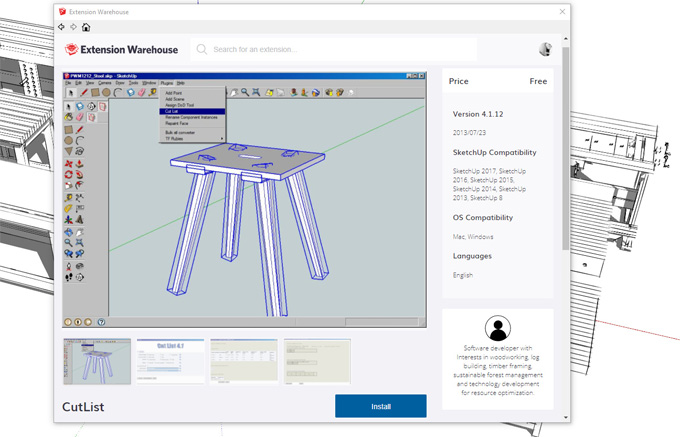
Downloading/Installing CutList 4.1.7 Plugin for SketchUp
Concept about the CutList 4.1.7 plugin for the SketchUp software
The CutList 4.1.7 plugin helps to produce a list of the parts, quantity and sizes of each part. The CutList 4.1.7 plugin also helps to produce a design layout of the parts on the selected design material size. This SketchUp plugin has been useful to estimate design materials for constructing the design model. The default settings of the CutList 4.1.7 plugin have been designed so that the user can install and get useful output with just three clicks.
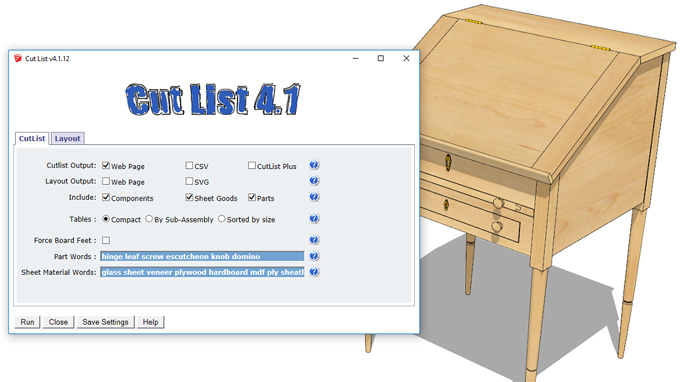
The material list of the CutList 4.1.7 plugin has been produced as a text file or a browser window display, which can also be printed. The material list has been produced as a CutListPlus(CLP)* import file, which has more sophisticated design material layout and costing functions than are built into the plugin. The CutList 4.1.7 plugin also helps to determine how much of each design material is required to produce the design.
The CutList 4.1.7 plugin is compatible with the different versions of the SketchUp software, including SketchUp 2013, SketchUp 2014, SketchUp 2015, SketchUp 2016 and SketchUp 2017. The supporting language for the CutList 4.1.7 plugin is English. This SketchUp plugin has been compatible with both Windows and Mac operating systems. If the user's computer of the user supports SketchUp software, then this SketchUp plugin is suitable for use. The installation procedure of this SketchUp plugin is the same for all versions of Mac and Windows. The CutList 4.1.7 plugin can work on all versions of the SketchUp software, including SketchUp Free, SketchUp Make and SketchUp Pro.
Learn about the key design features of the CutList 4.1.7 plugin for the SketchUp software
Generation of the automatic CutList
The CutList 4.1.7 plugin helps to analyse the SketchUp design model, which helps to produce a detailed list of parts. This list includes the different dimensions (for example, width, length or thickness) and quantities.
Cutting diagrams feature
The CutList 4.1.7 plugin also helps to create visual layouts for cutting parts from sheet lumber or goods. This feature enables the efficient use of the design materials.
Providing material support
The CutList 4.1.7 plugin helps to handle both solid wood and sheet goods, which accounts for the grain direction.
Component analysis feature
The CutList 4.1.7 plugin helps to report dimensions of bottom-level components or groups, which requires the design model to be organised into the design components for accuracy.
Providing user-defined parameters
The CutList 4.1.7 plugin enables users to set the sheet sizes, the blade thickness, the material thickness and also provide extra allowances for trimming.
Exporting and printing feature
The CutList 4.1.7 plugin helps to generate output, which can be displayed in a browser for export or printing as a CSV file. This CSV file has been used to create CutList Plus (CLP) files, which help to achieve an advanced cost estimation process.
Cross-Platform compatibility feature
The CutList 4.1.7 plugin has the cross-platform compatibility feature, as it can run on both Mac and Windows operating systems.
Providing support for Metric and Imperial
The CutList 4.1.7 plugin can operate in both Metric and Imperial measurement systems.
Discuss the installation process of the CutList 4.1.7 plugin for the SketchUp software
While installing the CutList 4.1.7 plugin for the SketchUp software, there are three steps that need to be followed, which are as follows:
Method 1:
In the case of installing the CutList 4.1.7 plugin from SketchUp Extension Warehouse, at first, the user has to start the SketchUp software. In the SketchUp software, the user has to select Window and go to the Extension Warehouse. In the Extension Warehouse, the user has to search for 'CutList' and has to select it. In the next step, the user has to click on the install button.
Method 2:
In the case of installing the CutList 4.1.7 plugin from the SketchUp extension installer, the user has to download it from the link. In the next step, the user has to start the SketchUp software, and has to go to Window and click on Preferences.
To learn more, watch the following video tutorial.
Video Source: Jon Grady
Download Cut List 4.1
In the next step, the user has to click on 'Extensions', and then they have to click on the 'Install Extension' button. After that, the user has to select the .rbz file that they just downloaded. Thus, the CutList 4.1.7 plugin has been installed in the system.