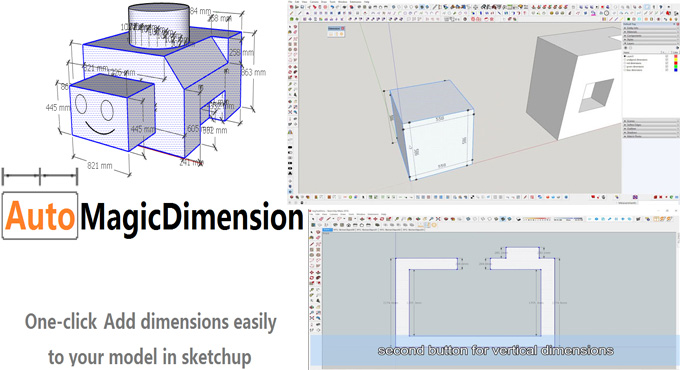
Auto Magic Dimensions Extension for the SketchUp Software
The Auto Magic Dimensions extension is a one-click dimension tool for the SketchUp software, which has been widely used by users to add more precise measurements in the design with just a single click. The Auto Magic Dimensions extension helps to speed up the design workflow by adding dimensions to the raw groups, geometry and design components instantly. With the help of the Auto Magic Dimensions extension, dimensions are placed automatically on the active layer at the time when the user clicks on the button. This design process helps to make it easy to hide the entire dimension set while preparing the scenes or printouts.
The Auto Magic Dimensions extension is compatible with different versions of the SketchUp software, including SketchUp 2023, SketchUp 2024, SketchUp 2025 and SketchUp 2026. The Auto Magic Dimensions extension is compatible with both Mac and Windows operating systems. The supporting language for the Auto Magic Dimensions extension is English.
Discuss the design features of the Auto Magic Dimensions extension for SketchUp software
One-click dimensioning feature
The Auto Magic Dimensions extension helps to select geometry, multiple-align design objects or groups and can add dimensions instantly.
Supporting multi-objects
The Auto Magic Dimensions extension helps to add dimensions throughout the gaps between the groups or design components in a single operation.
Offering advanced offset control
The Auto Magic Dimensions extension also helps to adjust the distance of the dimensions from the design geometry through the plugin settings.
Quick repositioning feature
The Auto Magic Dimensions extension also helps to hold a modifier key and can instantly click to move or flip the dimensions.
Offering clean and organised design output
With the help of the Auto Magic Dimensions extension, the design dimensions can stay aligned to the current view direction and layer for better control.
Learn about the Brighter 3D plugin for SketchUp software
Brighter 3D is another rendering plugin for the SketchUp software, which is involved in the creation of fast and noise-less renders that have been fully integrated into the SketchUp software. The Brighter 3D plugin combines a user-friendly design interface along with a rendering powerhouse under the hood. This SketchUp plugin is available as both a free and a pro version, which can be used by both beginners and advanced users.
The Brighter 3D plugin is compatible with SketchUp 2022, SketchUp 2023, SketchUp 2024, SketchUp 2025 and SketchUp 2026 versions. The Brighter 3D plugin is compatible with the Windows operating system, and the supporting language for this SketchUp plugin is English.
Understand the key design features of the Brighter 3D plugin for designing 3D models
Daylight feature
The shadow toolbar of the Brighter 3D plugin enables users to set up the perfect date, time and position of the design model, thus helping to achieve accurate daylight simulation.
Artificial lighting feature
The Brighter 3D plugin offers full support for area lighting, which enables users to create any artificial (area) lights in the designs. This feature also allows users to set up the colour, light temperature and light power of the design model.
Ambient Occlusion feature
The Brighter 3D plugin also offers Ambient Occlusion mode, which enables users to generate an image simply and quickly without setting up the lighting.
HDRI Lighting feature
The Brighter 3D plugin also offers the HDRI Lighting feature, which allows users to use hundreds of free HDR maps in the design; thus, the user can bring realism into their SketchUp renderings. These HDR maps have been used to add lighting, reflections and background in the design model.
Depth of field
With the help of the Brighter 3D plugin, the user can also access the depth of field camera effect, which enables them to focus on the given point in the scene.
➢ User Interface
The Brighter 3D plugin offers an intuitive one-window-at-a-time design interface, which can be easily accessed by users.
How to install the Brighter 3D plugin for the SketchUp software?
The user can download the Brighter 3D plugin from the official Brighter 3D homepage and has to click on the download option to download this plugin. After that, the user has to close the SketchUp software if it is running. In the next step, the user has to run the installer option and has to follow the prompts. After that, the user has to open the SketchUp software and has to find the Brighter 3D plugin in the Extensions menu within the SketchUp software. In the next step, the user can use View then click on the toolbars, which helps to show the Brighter 3D toolbar, and it has been done in the case of this option is not visible. After that, the user has to activate the license to access the design features of the Brighter 3D plugin for the SketchUp software.