AI Rendering Plugins for SketchUp Beginners: A step-by-step Guide for Visualizing your Architecture Designs
Discuss the AI-rendering Plugins for SketchUp Software
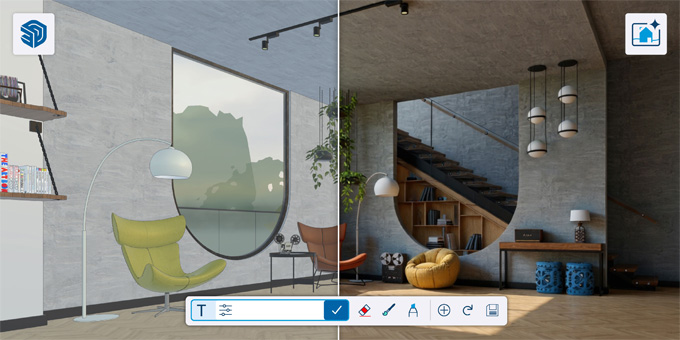
The Artificial Intelligence (AI) rendering plugins of the SketchUp software have become more popular tools due to the recent rapid developments in artificial intelligence technology. The AI plugins of the SketchUp software are faster than the traditional tools:
MyArchitectAI
MyArchitectAI is a popular AI plugin for the SketchUp software, which is best for interior and architectural design firms. This AI plugin is very easy to use and has been used to replace the whole design rendering workflow. The MyArchitectAI plugin is compatible with any kind of device. The MyArchitectAI plugin can run in the browser, which means there is no need to install.
D5 Render
The D5 Render is another SketchUp AI plugin, which can be used by the SketchUp architects, who are seeking a balance between the design quality, speed and AI-driven enhancements. The D5 Render plugin can be seamlessly integrated with the SketchUp software, which helps to offer more real-time visualisation features, as well as eliminate the hassle of re-exports and help to make the design workflow smoother. This SketchUp plugin helps to streamline the entire rendering process, which enables users to create and modify complex design structures effortlessly. The built-in asset library of the D5 Render plugin helps to provide a wide range of design materials, which enable users to populate the scene quickly.
SketchUp Diffusion
The SketchUp Diffusion plugin is best for design enthusiasts on a budget. The SketchUp Diffusion plugin helps to support the custom prompts as well as built-in rendering style presets; as a result, this AI plugin helps to accommodate the users regardless of their prompting experiences. The SketchUp Diffusion plugin is available as a free plugin for SketchUp users along with an active subscription. The SketchUp Diffusion plugin has been available as a native SketchUp extension.
Arko
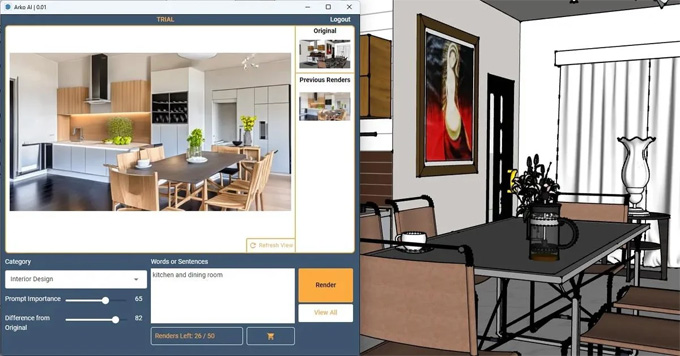
The Arko plugin is another AI rendering plugin for the SketchUp software, which can work both in interior and architectural design models. The Arko plugin helps to support custom prompts and negative prompts, which helps to give greater control over the design output than just presets. This SketchUp AI plugin is compatible with both Rhino and Revit software, which has been available in both Mac and Windows operating systems.
Veras
The Veras is another AI plugin for the SketchUp software, which can be widely used by architectural firms. This is the most versatile AI rendering software, which can be compatible with SketchUp, Rhinoceros, Revit, and Vectorworks. A wide range of customisation options has been offered by this SketchUp AI plugin, which offers a custom prompts feature, a prompt strength feature and a geometry and material override feature, which enable users to make the design outputs to the specific design needs. This SketchUp AI plugin can work on a Windows or Mac computer, or can also work directly in the browser.
LookX
The LookX acts as the all-in-one visualisation tool, which offers a real-time rendering feature and video generation feature on the basis of the text input, and style transfer. A wide range of creative possibilities has been offered by the LookX plugin for the 3D design models. The LookX plugin has the ability to train custom design models.
What are the key advantages of the AI plugins for the 3D modelling process?
Build a rich ecosystem
The intelligent tools of the SketchUp AI plugin have been integrated into the ecosystem to supercharge the modelling process, visualisation process and learning process of the designs.
Improving design workflow
The Artificial Intelligence technology of the SketchUp AI plugins is easy to use, which can be directly integrated into the design workflows of the SketchUp software, thus delivering unmatched value in a fraction of time.
Maintaining design transparency
The AI plugin features have been clearly understandable by the users, which helps to deliver more accurate and trustworthy design outcomes.
To learn more, watch the following video tutorial.
Video Source: SketchUp
Download AI Render
Improved collaboration among project stakeholders
The SketchUp AI plugins can engage the project stakeholders, including the employees, customers and communities, which helps to ensure that the design feature of the AI plugins will align with the societal values and industry best practices.
Data protection ability
The AI plugins for the SketchUp software help to ensure data confidentiality through the robust protection feature. The data achieved by the SketchUp AI plugins can comply with the global regulations, thus enabling individuals to control their data.
Improving design productivity
The AI plugins of the SketchUp software help to save hours of work by handling the complex and time-consuming rendering tasks. The AI plugins help to focus on the creation of incredible spaces, not on the complicated render systems. Thus, the SketchUp AI plugins help to boost design productivity.